Apple announced the latest operating system for their iPhones, iOS 17 during WWDC 2023 event. Now, after three months, the tech giant has finally rolled out the iOS 17 for end-users. You can download the iOS 17 update if your iPhone is equipped with the A12 Bionic chip or better. To update your phone to iOS 17 simply navigate to Settings > General > Software Update. Once you've got iOS 17 installed on your phone, here are some cool features that you can check out.
StandBy ModeStandBy mode is a rather simple feature added to iOS 17 and it has the ability to turn your iPhone into a smart clock. If you put your smartphone horizontally on a Magsafe wireless charger, it could turn into a smart clock that will display time, calendar, alarms, and more.
Live VoicemailLive Voicemail can provide you with someone’s voicemail in text. This will be the real-time transcription and the feature can also decline spam calls automatically.
VoicemailsVoicemails have also been added to FaceTime audio and video calls. So if you don’t want to pick up a call, the caller can simply send you a voicemail and you can also reply through voicemail.
Also read: 5 iOS 17 features that you won’t be able to use right now

This one is a really cool feature. It allows users to make their own profiles with pictures, emojis, and more. This profile will display on both the caller’s and receiver’s iPhones, something like WhatsApp calling. The calling interface has also been changed.
AirDrop upgradesThe iOS 17 has added two new features to AirDrop; Namedrop and SharePlay. NameDrop will be used to share your contact details by just tapping both of the Apple devices. It can be used on iPhones and Apple Watches. SharePlay will also do the same but it will share files like pictures, videos, etc.
The Music AppThe Music App now enables you to make a collaborative playlist with your loved ones. The Users can also use SharePlay in the Music App to pick their choice of songs playing in a car.
The Message AppThe Message App has been upgraded with some cool things. Apple has added some more emojis in the iMessage App. Along with that, you can now transcribe any voice message sent to you through iMessage.
Also read: iOS 17 beta 2 lets you NameDrop contacts between iPhones: How it works
Autocorrect upgradeThere are some words that the system corrects automatically even though the words are correct. With iOS 17, you can now write whatever you want but it needs to be an actual word. Additionally, your iPhone will learn how you type to make typing easier.
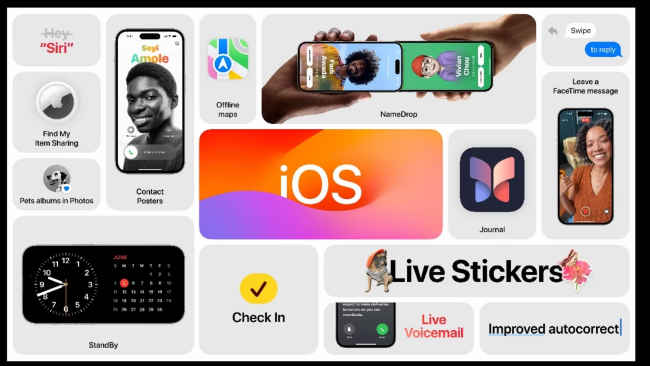
I always forget to inform my family and friends when I leave from somewhere or reach somewhere. In those situations, the Check In feature could be quite useful. This will help you in informing your family or friends that you have reached your destination. If you stop moving during your journey, it will send your location, battery level, and cell service status to the other person.
Journal appWith the new iOS 17 update, you will be able to access the new Journal App. This app will allow users to store their memories in a more unique way. Using machine learning, the Journal App will suggest unique ways and ideas to help us cherish our memories. Just like we usually make journal entries, the Journal App will make you do the same thing but on an app this time. You can journal based on things such as photos, music, workouts, and a lot more.
from Mobile Phones News https://ift.tt/5Ov4CUY
Comments
Post a Comment