Google has announced a new ‘live pointers’ feature for its presentation app Google Slides. This new feature aims to boost collaboration in Google Slides. It allows multiple people to see each other’s mouse pointers in real-time.
“To boost collaboration in Google Slides, we’re introducing live pointers, a new feature that allows you and your colleagues to see each other’s mouse pointers in real-time,” the tech giant said in a Workspace Updates blogpost on September 18.
Also read: How to use Google Docs, Slides and Sheets in Offline mode
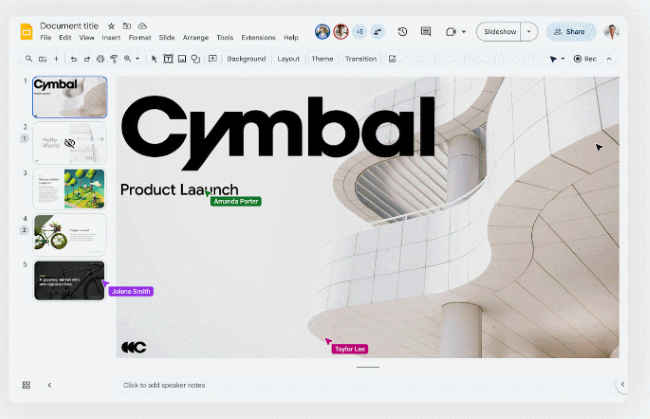
With this update, co-creators can easily point out specific text or visual elements within a Slide in order to highlight important information and content.
The live pointers feature will help to build connections when you're collaborating in real-time with others.
If you haven't received this feature yet, just wait a little more as it is currently rolling out.

This feature is off by default, so you have to enable this feature by following the below steps.
Step 1. Open Google Slides.
Step 2. Go to View.
Step 3. From the drop-down menu, select the Live pointers option.
Step 4. Then click on show my pointer.
Alternatively, you can turn the feature on by using the pointer icon in the toolbar.
It’s important to note that live pointers will remain visible across all slides until you turn them off.
To hide collaborator pointers for the current session, navigate to the present mode, or go to View > Live pointers > show collaborator pointers.
In our opinion, as the new live pointers feature facilitates real-time collaboration among multiple users working on the same presentation by allowing collaborators to see each other's mouse pointers, it makes it easier to communicate and coordinate while editing or presenting Google Slides.
Earlier this month, Google introduced new zoom keyboard shortcuts for Google Slides on web to help you zoom in, zoom out, or scale to 100 per cent. Additionally, you can now smoothly zoom in or out in Slides using the trackpad or mouse wheel with a modifier key (cmd/ctrl), making it easier to control your view of Slides.
from Apps News https://ift.tt/0WujH8a
Comments
Post a Comment