Apple has rolled out iOS 17 Beta 2 update and a highlight feature of this iOS version is NameDrop. Yes, a feature that was missing from the previous version is available now in this update. Let’s see what it is and how it works.
What is NameDrop on iOS 17?NameDrop lets you quickly and wirelessly transfer contacts between two iPhones by just bumping them together. Well, it is not just contact information you can share like this.
By bringing two iPhones (with iOS 17) together, you can AirDrop other file types too.
You don’t have to go through several menus and screens or open AirDrop to share photos, music, movies, etc.
Apple has added NameDrop to WatchOS 10 also and so Apple Watch users can also enjoy this convenience.
Also Read: Get iOS 17 early! Here's how to download the iOS 17 beta for free
NameDrop or the new AirDrop functionality works similarly to how Handoff transfers music seamlessly between iPhone and HomePod or how some Android smartphones let you swap files between them via NFC.
How NameDrop works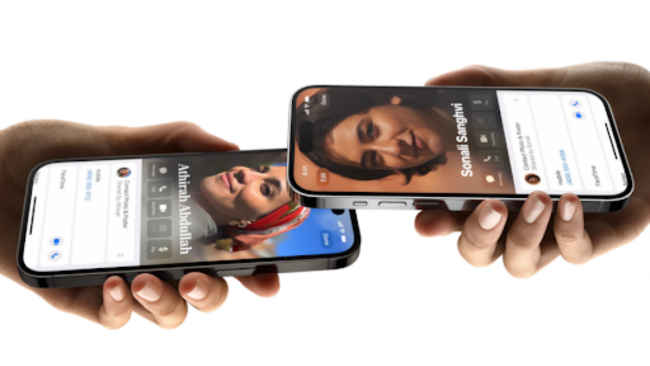
1. Ensure both iPhones are on iOS 17 and also have AirDrop enabled and visible to everyone.
2. Bring the iPhones closer and wait till the contact card appears on the receiving device. There is a nice animation to intimate the transfer.
Also Read: Can your iPhone get the iOS 17 update? Full list of iPhones supported below
The iPhones need not be unlocked. The transfer is quick and you will get a notification banner saying AirDrop Complete. Tapping on this banner takes you to the contact or the file you shared.
from Software News https://ift.tt/lutkU2K
Comments
Post a Comment