Instagram Reels download option is finally available but the company is going for a phased release meaning not every market has access to it yet. However, you may still want to know how to use it. Here’s how it works.
Download Instagram Reels, the official wayAdam Mosseri announced the new Instagram feature via his broadcast channel. You will get a download button, clicking which the reel gets saved in your camera roll/gallery.
Now, there are two conditions:
1. Only Instagram users in the US get the option to download Reels now. However, we have solutions for you at the bottom.
2. Also, one gets to download only Reels from public Instagram accounts.
Also Read: Reel edit, GIF comments: 3 awesome new Instagram features you must try
Another thing you need to know is that the Reels you download with this option could have an Instagram watermark along with the account name.
As for how you can save Reels to your phone gallery, check the step-by-step guide:
How to download Reels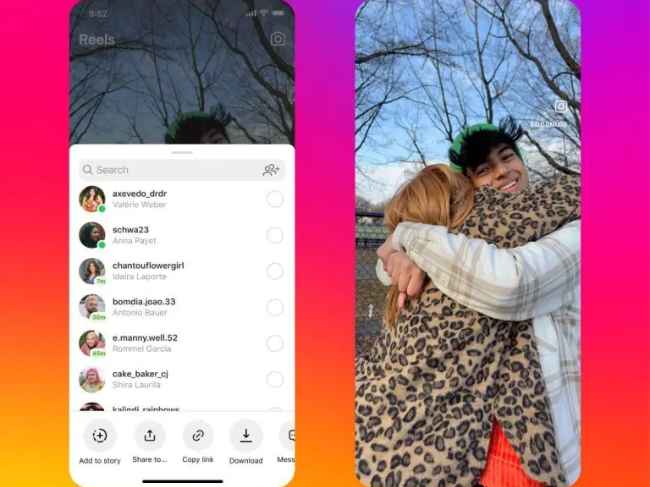
1. Open Instagram.
2. Go to any Reels on a public Instagram account.
3. Click on the Share button.
4. Now, among other options like Add to story, Copy link, you will also have a Download button.
Also Read: Instagram clones Elon's app with Meta's social media might: Is Twitter in danger?
Tapping it should save the Reel to the phone and you can watch even when the device is offline.
Finally, if you are in a market like India where the feature isn’t available yet, you can check out a 3rd party app like Barosave (Android) or Insaver (Android and iOS) instead.
Barosave (Android) lets you download a Reel right away or you can manually paste the Reels’ link into the app and tap the download button. Meanwhile, Insaver tries to download the Reels’ links you have copied to your phone’s clipboard. So, it will need access to your clipboard, which may not be preferable for some of us. That’s where an official app comes in handy as a reliable solution. Let’s hope the feature comes our way soon.
from Gaming News https://ift.tt/MOepTZc
Comments
Post a Comment