Google adds the ability to change screen resolution and other features on Android 13 beta 1: How to try
The first Android 13 beta is here. Google released the first of four beta versions recently and this one’s meant for the general public. However, the Android 13 beta 1 support is limited to select Pixel phones for now. We may get to learn about the other phone makers joining the Android 13 compatibility list at Google I/O in May. As for the Pixel users amongst you, we have a brief guide on how to install the Android 13 beta on your device. Here, we will also read about the various new Android 13 features discovered in this beta update.
List of Android 13 supported phones Pixel 4 Pixel 4a Pixel 4a 5G Pixel 4 XL Pixel 5 Pixel 5a 5G Pixel 6 Pixel 6 ProBesides, the above phones, the Pixel 6a might also launch soon (possibly at the Google I/O 2022 event) with Android 13 out of the box. The schedule for Android 13 for Samsung, OnePlus, and other phone makers may also be announced at this Google I/O in May.
Meanwhile, in India, you should be able to install Android 13 beta 1 on the Pixel 4a, since it was the last Pixel to launch in the country. But, note that this will have bugs and so proceed at your own risk. It is advisable to save a backup of the phone data somewhere before you go ahead.
How to download and install Android 13 beta on your phone
The device will boot with Android 13.
Android 13 beta 1 features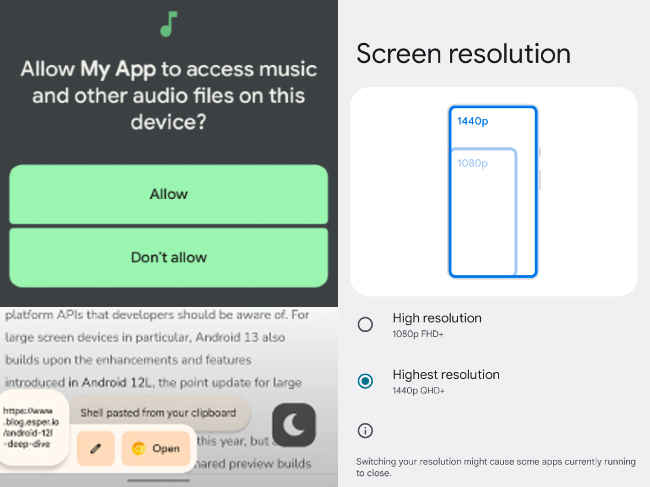
Source: Blog.esper.io
Say for better game performance or saving battery life, you can now change the screen resolution on Android 13. Android 13 allows you to control your smart home devices from the Device Controls menu and you don’t have to unlock the phone for accessing this. The permission to access media files on Android 13 has gotten granular with options like READ_MEDIA_IMAGES for images and photos, READ_MEDIA_VIDEO for videos, and READ_MEDIA_AUDIO for audio files. So you will not have to grant access to all media files on your phone. A new QR code scanner is also available on Android 13 that is faster in detecting, scanning, and retrieving information from the code. In Android 13 beta 1, a new clipboard UI will appear on the bottom left corner of the screen when you copy some text. The 'soundfx' folder among the Android system folders have a shared library called 'libspatialaudio.so' that suggests the coveted spatial audio feature. This is something present on recent Apple iPhones. Improved playback seek/progress bar on the notification shade, more Material You colors, and other UI tweaks.So, although a few changes, they are interesting ones nonetheless, and if you happen to run Android 13, do try them.
As for other news, reviews, feature stories, buying guides and everything else tech-related, keep reading Digit.in.
from Software News https://ift.tt/nJX3KCS
Comments
Post a Comment