WhatsApp is getting an option to send files of up to 2GB in size according to WABetaInfo. This new feature may be something you find very useful as the current limit of 100MB is rather limiting. At times when you want to share a file or document over WhatsApp with your friend or somebody in your contacts, then this current limit forces you to try some other app. However, those other apps lack the convenience of WhatsApp or say the accessibility of contacts from any part of the world at your fingertips. You don’t require the other person to be in close proximity as the WhatsApp file transmission takes place over the internet.
How to send up to 2GB of files on WhatsApp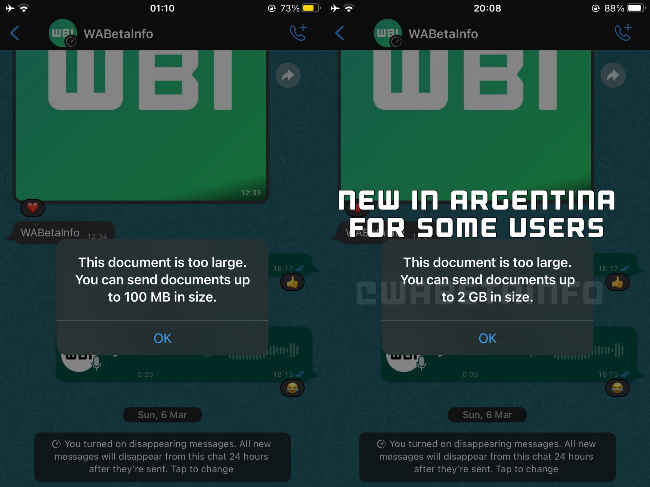
WhatsApp 2GB file transfer feature | Source: WABetaInfo
Ensure your WhatsApp is up to date. At present, the 2GB file sharing is available on WhatsApp beta version 22.7.0.76 for iOS and beta v2.22.8.5 or later for Android. Also, note it is being rolled out to some WhatsApp users in Argentina only.
Check Apple App Store or Google Play Store and update the WhatsApp beta (if you have it) to the latest version.
Open WhatsApp Tap on the WhatsApp contact to whom you want to send the file or document. Hit the Plus icon (on iOS) or Pin icon (on Android). From the menu that pops up, choose the Document option. A built-in file manager would appear and from it select the file which could be a document or something else. Tap on Send and the file will be sent to the contact.Here, you can choose file or multiple files of up to 2GB. If you are trying to send beyond that threshold, then you will see the “This document is too large. You can send documents up to 2GB in size,” message.
Soon, this update may roll out to India and other markets, initially through beta channels but eventually via Stable releases too. So you may have to wait a bit to try this new WhatsApp feature.
For more news, reviews, feature stories, buying guides, and everything else tech-related, keep reading Digit.in.
from Apps News https://ift.tt/59OHsKw
Comments
Post a Comment