
Google adds Gmail Search Filter Update and Personal Settings for Android Users

Google is continuously updating Google Workspace regularly, and this time, Gmail for Android is getting an improved search feature. Previously we saw the addition of Chat and Spaces along with the change in the UI as well. This time, Google is adding a search filter, which can be used by tapping the search box and will appear just below it. The aim is to allow users to quickly and easily filter email search results on their mobile devices. It will help you find a specific email or information based on the filter selected from the drop-down list. It will either consist of the name of the sender or the timeframe of receiving the email. You can select a single sender or multiple senders at a time. 
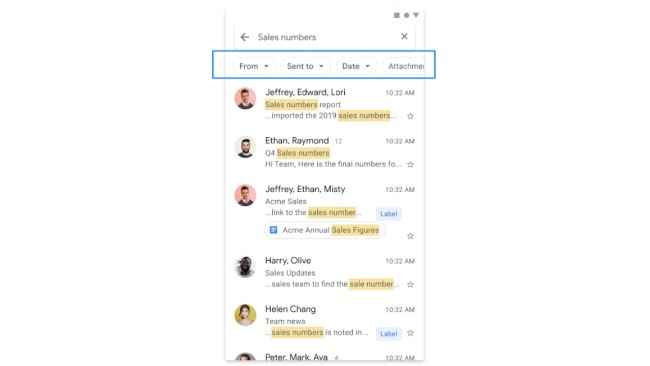
Gmail Search Filter Update: Rollout and Availability

Gmail Search Filter Update: Rollout and Availability 

Google announced this feature via the Google Workspace Updates blog. This update has begun to roll out from 20th September and will be available to all the users by the end of October. It will be available to all Google Workspace customers, as well as G Suite Basic and Business customers.

Google Personal results setting for Search on Android

Recently, 9to5Google spotted the addition of Personal results setting on the Google App for Android. This update will be controlling personalised results on Search. Users can turn on or off these settings by following the path Settings > Personal Results on the Google app homepage. It will allow users to disable or enable this option via the app, so you can allow Google to use your account data for personalised results. 
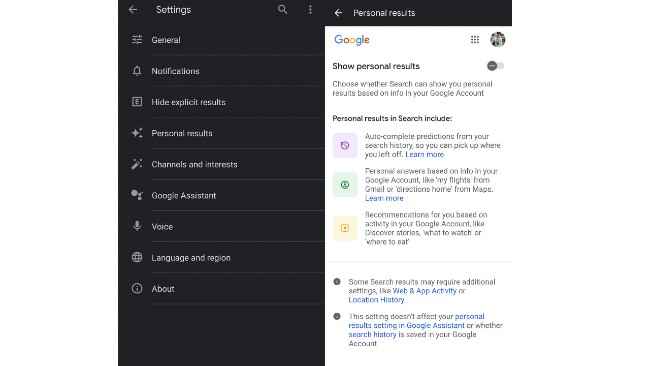
Google Personal results setting for Search on Android

This feature will include: Autocomplete predictions based on your search history  Results based on your account data like your location, dates and reminders Personalised results based on your regular Google activities like what to eat, places to visit, etc.

Source Video: Google Workspace


from Apps News https://ift.tt/3ocwgCY

Comments

Popular posts from this blog

YouTube Music Season Recap 2022: How to View the Spring Recap

YouTube is a jump ahead of Spotify with its Season Rewind playlist feature. Well, besides playlists, the service offers you a list of your most played artists, songs, albums, etc in the previous season. It will be a recurring thing and is poised to come out every season. Meanwhile, its biggest competitor Spotify’s Wrapped is a bop every time it lands but is limited to annual appearance. There in lies one big difference between the two approaches. Let’s see what else you could expect out of the new YouTube Music feature. YouTube Season Recap: How it works Source: u/DecentSizedTurd (Reddit) Like the YouTube Recap 2021, this one too would share personalized listening stats. YouTube calls this “an exploration of your top artists, songs, albums and playlists over the last season”. To view it, you just need to go to music.youtube.com/recap or the landing page on the YouTube Music app for Android and iOS. Right now, only some users have got the spring Youtube Music playlist. But the...