OnePlus Gaming Triggers are now available to purchase in India from the official website. The OnePlus Gaming Triggers were announced alongside the OnePlus 9 series smartphones in March and aim to improve the overall gaming experience offered by mobile phones. These triggers are an add-on accessory that clip to the smartphone and act as shoulder buttons like on a gamepad.
We designed the OnePlus gaming triggers to be solid, responsive, pleasingly “clicky,” and, yes, beautiful. We also made sure they work with many other phones—because the best product design is one that leaves you free to make your own choices. pic.twitter.com/hJNa4Dsa5s
— Pete Lau (@PeteLau) April 21, 2021 OnePlus Gaming Triggers price and availabilityThe OnePlus Gaming Triggers are priced at Rs 1,099 in India and are available to purchase from the official OnePlus India website.
OnePlus Gaming Triggers features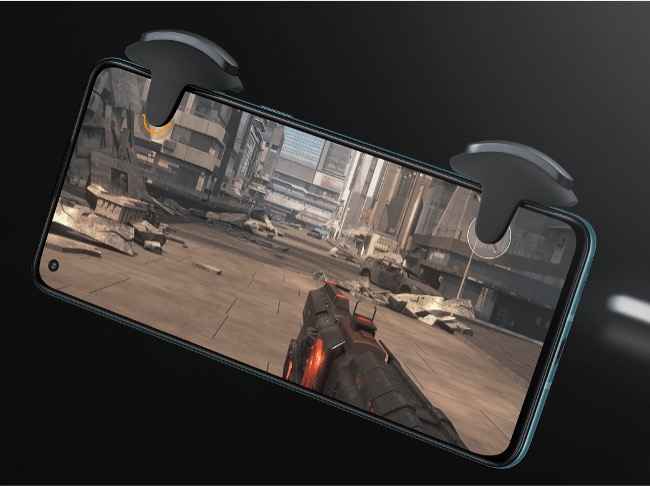
The OnePlus Gaming Triggers are designed keeping in mind the popular battle royale games including PUBG Mobile, Call of Duty: Mobile, Free Fire and more. These gaming triggers will work with any game that lets users customize the layout of the controls. The OnePlus Gaming Triggers can be attached to any smartphone that has a maximum thickness of upto 11.5 millimetres.
As revealed by CEO Pete Lau, the OnePlus Gaming Triggers are compatible with multitudes of Android and iOS devices as well. These triggers have silicone pads that use capacitive conduction to interact with the display and lets you perform the required in-game action.
The OnePlus Gaming Triggers use Omron switches that are often seen on a gaming mouse and offer better tactile feedback. The triggers are built from plastic and zinc alloy materials and weigh 22 grams.
While these gaming triggers have been optimized for OnePlus smartphones and can be used with a screen protector, there are chances that it may affect the touch sensitivity of mobile phones when attached.
After clamping the triggers onto the phone, users will need to go into the settings menu of each game to customize the control layout to relocate the action buttons. The in-game action buttons should be placed below the gaming trigger pads so that they get activated whenever the triggers are pressed.

from Latest Technology News https://ift.tt/3tHRB77
Comments
Post a Comment