Apple Music for iOS received a minor visual overhaul and a few new features along with Apple’s latest iOS 13 update last week but it appears those changes are, fortunately, not exclusive to Apple users. In the latest stable update, Apple Music for Android has received support for Chromecast, an optional dark theme, and a real-time lyrics readout feature. Users of the app should be able to see the changes appear in the latest version of Apple Music (v3.0.0).
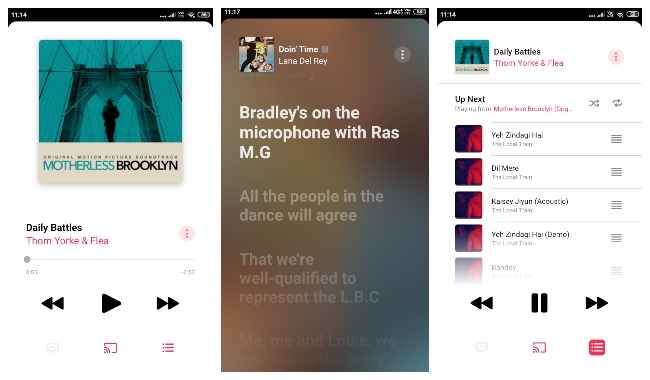
The biggest visual change lies in the Now Playing screen of the Apple Music app. The bottom area now houses three centered icons instead of the previous corner-aligned two. Clicking the first icon during music playback brings up a real-time lyrics readout page. What that means is that the app will synchronise the displayed section of the lyrics with the current position of the song. It will also match the auto-scroll speed with the song’s tempo so you can start singing along to the tune as soon as you hit the button.
Clicking the second icon brings up the familiar Chromecast ‘Cast to’ prompt, which lets you cast music to a Chromecast device of your choice. This feature was until now present in the recent beta versions of Apple Music. This is the first stable version to come with native support for Chromecast. Clicking the third icon brings up a slightly revamped Up Next screen, which contains a list of songs that will be played next along with options to shuffle and repeat.
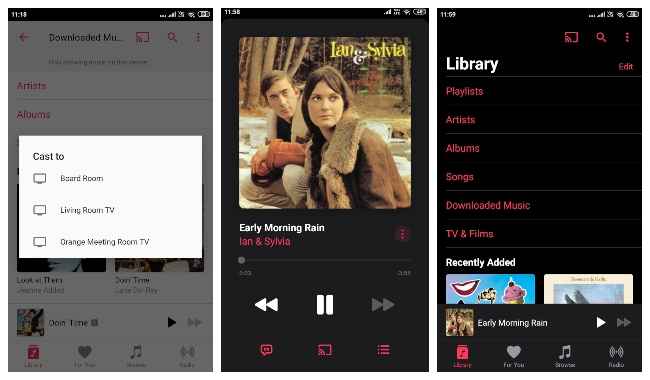
In addition, Apple Music for Android gets a dark theme that turns on automatically when dark mode is enabled at a system level in Android 10. Of course, it can also be enabled or disabled manually from Settings on older Android versions. According to Apple, the updated Android app also gives users access to “over 100,000 broadcast radio stations from around the world”. You can download Apple Music for Android from here.

from Latest Technology News https://ift.tt/2lT8Wwa
Comments
Post a Comment