Microsoft introduces Google Lens-like Character Recognition in Excel for iOS to convert smartphone photos into spreadsheets
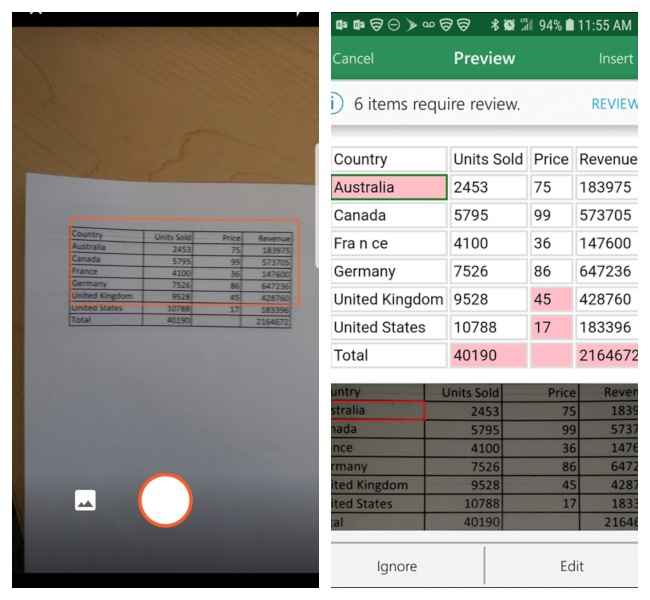
Microsoft seems to be taking hints from Google’s image recognition techniques. The software giant has introduced a new feature on Microsoft Excel for iOS, to help users covert their images into spreadsheets. Data presented on a piece of paper within columns and rows can simply be snapped using a smartphone camera. This data can then be converted into an editable Excel spreadsheet using the app’s Data from Picture feature. Microsoft uses a combination of optical character recognition (OCR) and machine learning to identify the characters on the paper and input them into a digital spreadsheet. In the past, we’ve seen OCR implementation on Google Lens which allows users to scan any image using their smartphone camera and extract text from it into an editable digital format.
Microsoft Excel's OCR feature was first announced in September 2018 and was made available on Android in March 2019. The image recognition tool in the Microsoft Excel Android and iOS apps is available through a button called Insert Data from Picture. “New image recognition functionality automatically converts the picture to a fully editable table in Excel, eliminating the need for you to manually enter data,” Microsoft wrote in a blog post explaining the feature. You can head here to see an instructional video on how to copy data from an image to an Excel spreadsheet.
Beyond Excel, Microsoft is also giving users the ability to copy data written on White boards using ink grab. Users can now take a picture of their notes scribbled on a physical whiteboard and convert them to digital ink in the Microsoft Whiteboard app. The company has also built handwriting recognition into OneNote, so users can convert handwritten notes to digital text quickly.
“We envision that you’ll be able to take a picture of handwritten notes on paper and import the text directly. Other areas we’re exploring include scanning a picture, PDF annotation, and signing,” Microsoft noted in its blog post.

from Latest Technology News http://bit.ly/2W4a0tj
Comments
Post a Comment