Chrome is one of the most widely used browsers on mobile phones and is generally considered safe as it is developed and maintained by Google. However, developer Jim Fisher has found a new exploit, which showcases how an attacker could emulate the browser’s address bar to impersonate a legit website. While this might not sound scary, the way Fisher demonstrated its application in a proof of concept video might make some privacy-centric users double check the address bar before entering any personal information on a website. Using few web designing skills and tricks, the developer created a website that replaces Chrome’s address bar and its UI.
Fisher calls the new phishing method ‘The inception bar'. One can visit the developer's website on mobile phones here to experience how someone could modify their site to lock a user in. He explains that when one scrolls down on a webpage in Chrome, the URL bar is hidden and reappears when one scrolls back up. However, a phishing site can display its own fake URL bar when the user scrolls down and trick Chrome into not displaying the original address bar when a user scrolls up. Unfortunately, this too can be prevented with some clever programming as Fisher added extra tall padding element on top of the site so that users are scrolled back down to where the content starts and it looks like a page refresh.
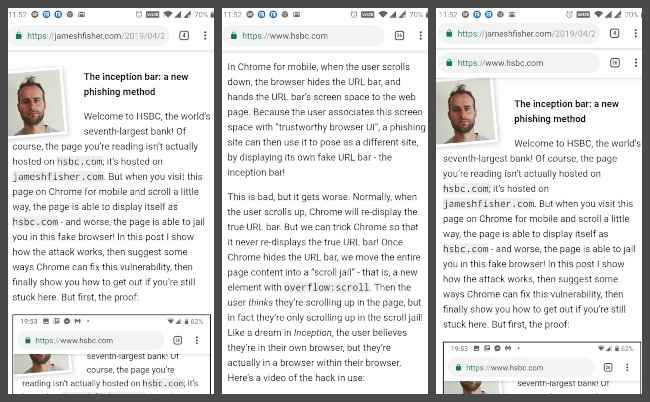
‘In my proof-of-concept, I’ve just screenshotted Chrome’s URL bar on the HSBC website, then inserted that into this webpage. With a little more effort, the page could detect which browser it’s in, and forge an inception bar for that browser. With yet more effort, the inception bar could be made interactive. Even if the user isn’t fooled by the current page, you can get another try after the user enters “gmail.com” in the inception bar!,” state’s Fisher’s blog post. You can watch his proof of concept video here.
The developer thinks this method can be a serious security flaw since he created it and accidentally used it a few times. Users can only verify the legitimacy of an address bar when the page loads, as when they scroll down, the address bar is replaced. As 9to5Google notes, one can lock and unlock their phone to force Chrome for Android to display the real address bar and the fake one.

from Latest Technology News http://bit.ly/2PBJW72
Comments
Post a Comment